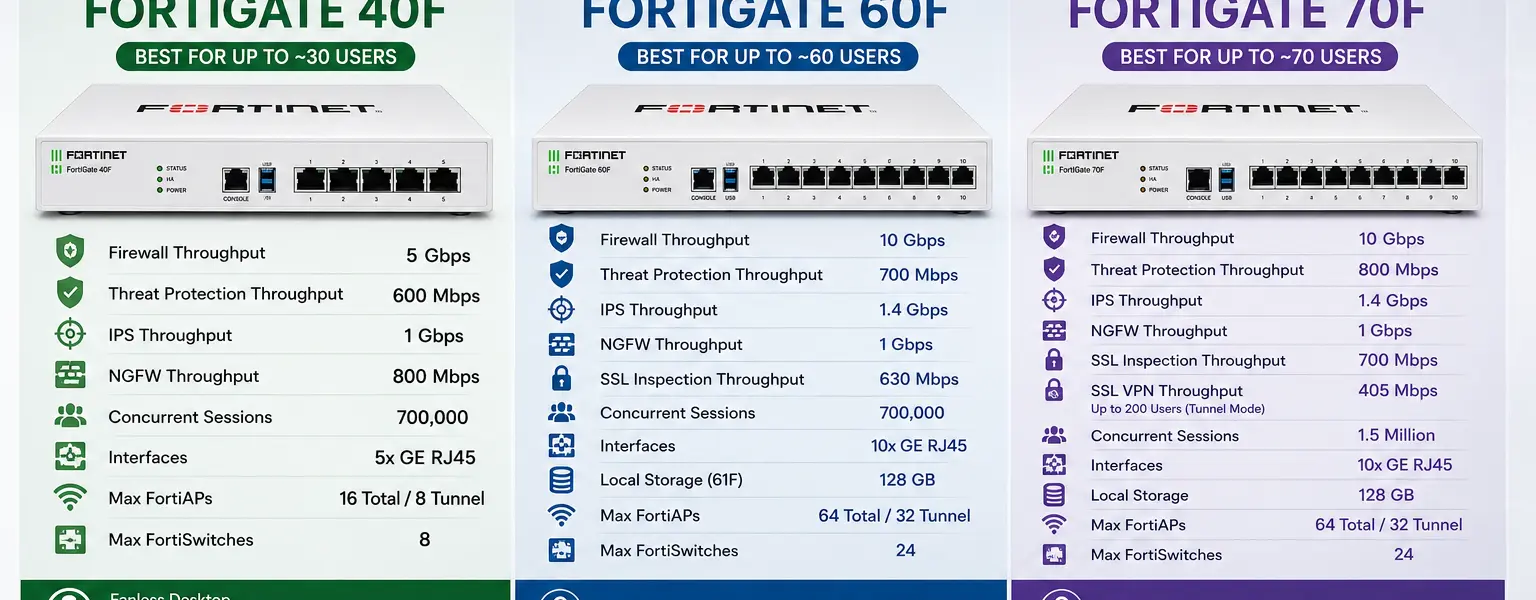
If you are comparing the FortiGate 40F vs 60F Canada options for your organization, the honest answer is that both are excellent appliances and the right choice depends on your user count, bandwidth needs, and port requirements. The 70F adds another step up for sites pushing toward 50 to 70 concurrent users. This guide walks through the verified specs for all three models so you can make a purchasing decision based on facts rather than guesswork.
Before getting into the differences, it helps to understand what these three models share. All three are desktop form factor appliances powered by Fortinet’s NP6XLite and CP9 security processors. All three run FortiOS and support the full FortiGuard security service stack including the ATP, UTP, and ENT bundle tiers. All three are covered by FortiCare Premium support when purchased with any of those bundles, which means 24×7 support with a one-hour response time for critical issues at no extra cost.
All three integrate natively with the Fortinet Security Fabric, so they work directly alongside FortiSwitch, FortiAP, and FortiManager in a unified management architecture. If you are already running Fortinet infrastructure or planning to build a fabric-based environment, any of these three models fits cleanly into that design.
The specs below are taken directly from Fortinet’s official product matrix, published February 2026. All performance figures are “up to” values measured under lab conditions.
The FortiGate 40F is the entry point in this tier. Fortinet sizes it for up to approximately 30 users based on threat protection throughput. The hardware spec from the Fortinet product matrix breaks down as follows:
The 40F has 5 GE RJ45 ports. One is typically used as the WAN interface, leaving 4 for internal use. It supports up to 16 FortiAPs in total (8 in tunnel mode) and up to 8 FortiSwitches. That is a reasonable wireless and switching footprint for a small office running 10 to 20 users.
One important operational note: on FortiOS 7.6.0 and above, SSL VPN is not supported on the 40F due to its 2GB RAM configuration. If your users depend on SSL VPN for remote access, either plan for IPsec VPN or move to a model with more memory. The 40F supports up to 200 IPsec client-to-gateway tunnels.
The 40F is the right fit for small branch offices, retail locations, and businesses with 10 to 25 users who need a capable NGFW without the cost or physical footprint of a larger appliance.
The FortiGate 60F is the most commonly purchased model in this size range for Canadian SMBs, and the specs justify the popularity. Fortinet sizes it for up to approximately 60 users. Key numbers from the verified matrix:
The jump from 5 ports on the 40F to 10 ports on the 60F is significant. The 60F gives you 7 internal ports, 2 WAN ports, and 1 DMZ port. That layout supports proper network segmentation without needing an external switch just to connect core devices. The doubling of supported FortiAPs from 16 to 64 also matters for offices running a meaningful wireless infrastructure.
The 60F shares the same SSL VPN limitation as the 40F on FortiOS 7.6.0 and above due to the 2GB RAM constraint. Plan accordingly if SSL VPN is part of your remote access architecture.
For most Canadian businesses running 25 to 50 users with standard internet connectivity and moderate security inspection requirements, the FortiGate 60F hits the right balance of price and capability. When comparing FortiGate 40F vs 60F Canada pricing, the 60F carries a higher upfront cost but delivers meaningfully more in port density and wireless management capacity.
The FortiGate 70F targets sites in the 50 to 70 user range, or organizations that need more session capacity and better SSL VPN support than the 40F and 60F can deliver. The verified specs:
The most meaningful differences between the 70F and 60F are the concurrent session count and SSL VPN support. The 70F doubles the concurrent sessions from 700,000 to 1.5 million, which matters for environments with a high volume of simultaneous connections such as VoIP deployments, busy branch offices, or sites running a lot of IoT or OT devices alongside user traffic. The 70F also supports SSL VPN on current FortiOS versions, giving you more flexibility for remote access without needing to rely entirely on IPsec tunnels.
Threat protection throughput also steps up from 700 Mbps on the 60F to 800 Mbps on the 70F, which is a modest but real gain if you are running full UTM or ENT inspection on a higher-bandwidth internet connection.
The right model depends on four variables: user count, port requirements, remote access needs, and budget. Here is a direct decision framework:
Choose the 40F if: You have 10 to 25 users, you do not need SSL VPN on current FortiOS, you have a single WAN connection, and you want the lowest entry cost in the FortiGate desktop range.
Choose the 60F if: You have 25 to 50 users, you need a DMZ port and proper network segmentation built into the appliance, you are managing 10 or more FortiAPs, or you are replacing an aging appliance and want room to grow.
Choose the 70F if: You have 50 to 70 users, you need SSL VPN on current FortiOS, you are running a high volume of simultaneous connections, or the 600 to 700 Mbps threat protection range of the 40F and 60F is tight for your actual internet bandwidth.
One additional consideration for Canadian organizations: if you are subject to PIPEDA data handling requirements or running SOC 2 audited infrastructure, the logging and forensics capability that comes with local SSD storage on the 61F, 71F, and 70F matters. On-box log storage reduces your dependency on an external FortiAnalyzer for short-term retention, though a dedicated FortiAnalyzer is still recommended for any serious compliance posture.
Hardware pricing is only part of the equation. The FortiGuard security services bundle is what activates threat protection, and the bundle you choose determines what coverage you get.
The three available bundles are ATP (Advanced Threat Protection), UTP (Unified Threat Protection), and ENT (Enterprise Protection). ATP covers IPS, antivirus, advanced malware protection, FortiSandbox SaaS, application control, and inline CASB. UTP adds URL filtering, DNS filtering, video filtering, and anti-botnet and command-and-control communication blocking on top of ATP. ENT adds DLP, AI-based inline malware prevention, IoT detection and vulnerability correlation, and attack surface monitoring and risk scoring on top of UTP.
FortiCare Premium support, which provides 24×7 coverage with a one-hour critical response time, is included in all three bundles at no additional cost. Bundles are available in 1, 3, and 5 year terms. Multi-year terms typically deliver better per-year pricing and reduce the administrative burden of annual renewals.
For most Canadian SMBs, UTP is the practical baseline. It covers the filtering and botnet protection that most compliance frameworks and cyber insurance underwriters expect to see. ENT is worth evaluating if you have DLP requirements or IoT devices on your network.
For current Canadian pricing in CAD on hardware and bundle options across the 40F, 60F, and 70F, contact DataCenter360 directly for a quote.
If you have been researching FortiGate hardware recently, you may have come across the G-series models including the 50G, 70G, and 90G. These are newer generation appliances built on Fortinet’s SP5 processor with significantly higher throughput, more memory, and full SSL VPN support on current FortiOS. The 40F, 60F, and 70F are F-series appliances still in active production and fully supported, but the G-series represents Fortinet’s current generation platform.
Whether to buy F-series or G-series depends on your timeline, budget, and whether the performance and feature differences justify the price delta for your specific use case. DataCenter360 can walk you through that comparison in detail before you commit to a purchase.
Is the FortiGate 60F still a good purchase in 2026?
Yes. The 60F is a current production appliance with full FortiOS support, active FortiGuard service bundles, and a hardware profile well suited to offices in the 25 to 50 user range. It is not the newest generation, but it delivers proven performance and has a broad install base across Canadian SMBs. If budget is a constraint or you need to match an existing F-series environment, the 60F remains a solid choice.
What is the difference between the FortiGate 60F and 61F?
The 61F is a variant of the 60F that includes 128 GB of onboard SSD storage. The 60F base model has no local storage. The 61F is worth the incremental cost if you want on-box log retention or plan to use the appliance as part of a FortiAnalyzer-less logging setup for short-term retention.
Does the FortiGate 40F support SSL VPN in 2026?
Not on FortiOS 7.6.0 and above. Fortinet removed SSL VPN support from models with 2GB RAM starting with FortiOS 7.6.0. The 40F falls into that category. If SSL VPN is a requirement, choose the 70F, which retains SSL VPN support, or plan to use IPsec VPN on the 40F or 60F.
How do I get a quote for FortiGate 40F, 60F, or 70F hardware in Canada?
Contact DataCenter360 for Canadian pricing in CAD including hardware, bundle licensing, and multi-year term options. As a Fortinet Select Partner and MSSP, DataCenter360 can quote hardware and services and assist with sizing, deployment, and ongoing management.
DataCenter360 is a Fortinet Select Partner and MSSP based in Toronto, serving businesses across Canada. Whether you are buying your first FortiGate or replacing an aging appliance, the team can help you select the right model, quote the right bundle, and get the hardware deployed and configured correctly.
Contact DataCenter360 at datacenter360.ca/contact-us or call 647-255-1700 to speak with a Fortinet specialist.
