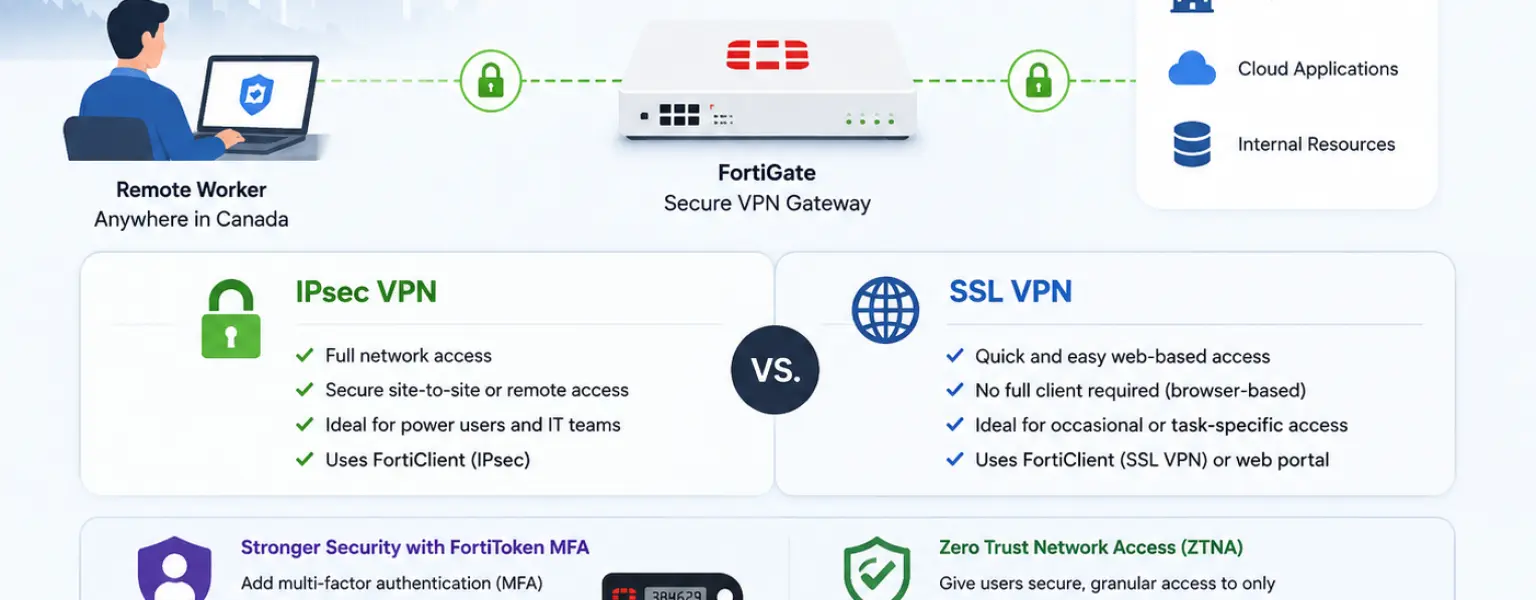
FortiGate VPN Canada businesses use for remote access is built directly into FortiGate next-generation firewalls, giving IT teams a secure and scalable way to extend corporate network access to employees working from home, satellite offices, or anywhere outside the perimeter. This post explains how FortiGate VPN works, what changed in recent FortiOS versions, and what a properly secured remote access environment looks like for a Canadian SMB or mid-market organization.
Remote work is no longer an exception for most Canadian businesses. It is a permanent operational reality. But the security infrastructure supporting it has not always kept pace. Many SMBs extended remote access in a hurry and never revisited the configuration. Others are running SSL VPN setups that are now outdated or have known vulnerabilities that went unpatched.
The Canadian Centre for Cyber Security consistently identifies VPN vulnerabilities and credential-based attacks as among the top entry points for ransomware targeting Canadian organizations. A remote worker connecting over an improperly configured tunnel is a potential entry point to every system on the corporate network.
FortiGate VPN Canada IT teams deploy addresses this directly. As a next-generation firewall with built-in VPN capabilities, it provides remote access integrated with the same security stack inspecting all other traffic, not a bolt-on product that bypasses your security controls.
FortiGate supports two remote access VPN technologies: IPsec VPN and SSL VPN. Understanding the difference matters for Canadian IT managers configuring or planning remote access infrastructure, particularly given a significant change Fortinet introduced in FortiOS 7.6.3.
IPsec VPN is the standards-based protocol that encrypts traffic at the network layer. On FortiGate, it is configured and managed through the FortiOS interface and accessed by remote workers through the FortiClient endpoint application. IPsec offers strong encryption, efficient performance, and low latency. It supports both UDP and TCP transport modes, with an automatic fallback that switches to TCP if UDP connections are blocked by the remote network. For organizations running enterprise security policies, IPsec integrates cleanly with FortiGate’s authentication mechanisms including FortiToken MFA and SAML-based identity providers.
SSL VPN historically provided browser-based or client-based access over port 443, making it convenient in environments where IPsec ports might be blocked by a hotel firewall or a restrictive ISP. FortiGate supported two SSL VPN modes: web mode, which gives portal-based access to specific applications, and tunnel mode, which provided full network layer access similar to IPsec.
As of FortiOS 7.6.3, Fortinet has replaced SSL VPN tunnel mode with standards-based IPsec VPN. Organizations running FortiOS versions below 7.6.3 that use SSL VPN tunnel mode need to complete a migration to IPsec VPN before upgrading. Fortinet has published a migration guide covering this process in detail. SSL VPN web mode continues to function and serves use cases where portal-based access to specific applications is needed without full tunnel connectivity.
For most Canadian businesses, IPsec VPN through FortiClient is the recommended path for full remote access today. It is faster, more reliable under varied network conditions, and the architecture Fortinet is investing in going forward.
FortiClient is the endpoint application remote workers install to connect to a FortiGate VPN. It handles IPsec tunnel establishment, authentication, and in its licensed version, endpoint security functions including vulnerability scanning and web filtering. A free version of FortiClient handles basic VPN connectivity. The licensed version, managed through FortiClient EMS (Endpoint Management Server), adds centralized policy management, security posture checking, Zero Trust tagging, and ZTNA capabilities. For organizations managing a distributed workforce across multiple Canadian cities or remote sites, EMS provides visibility and control to enforce consistent security policy regardless of where employees connect from.
FortiToken MFA integrates directly with FortiGate IPsec VPN. Remote workers authenticate with their credentials plus a push notification or one-time password from FortiToken Mobile. This two-factor requirement closes the single largest attack vector on remote access infrastructure: stolen or phished credentials. FortiToken Mobile push MFA for IPsec VPN is supported from FortiClient 7.2.4 and later, and the authentication experience is seamless enough that it does not create meaningful friction for users.
Traditional VPN grants a connected user broad access to the corporate network. That model worked when most users and most resources were inside the perimeter. It creates real risk in an environment where remote workers are connecting from personal devices on home networks, and where a single compromised endpoint can move laterally across everything it can reach.
FortiGate ZTNA addresses this by shifting from network-level access to application-level access. Instead of putting a remote worker on the network and trusting them to reach only what they should, ZTNA verifies the user and the device for every application session. Access is granted to specific applications based on identity and device posture, not network membership. Applications that a user has no reason to access are not reachable at all, reducing the attack surface significantly.
FortiOS enables ZTNA capabilities built into the FortiGate firewall, meaning existing FortiGate customers can move toward a Zero Trust remote access model without purchasing a separate product. For Canadian organizations managing compliance obligations under PIPEDA or sector-specific frameworks, ZTNA’s application-level access controls and continuous verification provide a stronger technical foundation than traditional VPN alone.
A properly deployed FortiGate VPN in Canada typically combines IPsec tunnels terminated at the office FortiGate, FortiClient on endpoints, FortiToken MFA, and firewall policy that applies full inspection to VPN traffic. Split tunneling is a configuration decision that affects both security and user experience. With split tunneling enabled, only traffic destined for corporate resources routes through the VPN tunnel while general internet traffic exits locally. With split tunneling disabled, all remote worker traffic routes through FortiGate, giving the organization full visibility and inspection over everything the user does online. The right choice depends on the organization’s security posture requirements and the capacity of the internet connection at the office end.
For organizations running multiple locations across Canada, FortiGate also supports site-to-site IPsec VPN between offices, extending the same secure fabric to branch locations without backhauling traffic through a central point.
FortiGate VPN configuration is not complicated for a trained engineer, but it has enough moving parts that a misconfiguration can leave the organization exposed without anyone realizing it. Split tunnel policies, firewall access rules, MFA enforcement, certificate management, and keeping FortiOS and FortiClient updated are all ongoing responsibilities that fall to whoever owns the network security function internally.
For Canadian organizations that do not have a dedicated network security engineer on staff, a Fortinet MSSP can manage the full remote access environment. That includes initial VPN design and deployment, FortiClient EMS management, FortiToken MFA setup, and ongoing monitoring to ensure the configuration stays correct as the workforce and the threat landscape evolve.
DataCenter360 is a Fortinet Select Partner and MSSP serving Canadian businesses from Toronto. The team designs, deploys, and manages FortiGate VPN Canada organizations depend on for secure remote access, including IPsec VPN configuration, FortiClient EMS setup, FortiToken MFA, and ongoing security management. If your organization is running outdated remote access infrastructure or preparing to roll out secure remote access to a growing workforce, reach out at [email protected] to discuss your requirements. You can also learn more about our managed security services for Canadian businesses.
IPsec VPN encrypts traffic at the network layer and is accessed through the FortiClient application. It offers strong performance and integrates with enterprise authentication systems including FortiToken MFA and SAML identity providers. SSL VPN provided browser-based or client-based access over port 443. As of FortiOS 7.6.3, Fortinet replaced SSL VPN tunnel mode with standards-based IPsec VPN, which is now the recommended approach for full remote access. SSL VPN web mode, which provides portal-based access to specific applications, continues to be supported.
For IPsec VPN tunnel access, remote workers need to install FortiClient on their device. A free version of FortiClient handles basic VPN connectivity. The licensed version, managed through FortiClient EMS, adds endpoint security features, Zero Trust posture checking, and centralized management. SSL VPN web mode can be accessed through a browser without installing client software, but it provides portal-based access to specific applications rather than full network connectivity.
FortiGate IPsec VPN supports MFA through FortiToken, Fortinet’s purpose-built authentication solution. Remote workers authenticate with their username and password, then confirm their identity through a push notification or one-time password in the FortiToken Mobile app. This two-factor requirement means that compromised credentials alone cannot grant VPN access. FortiToken Mobile push MFA for IPsec VPN is supported on FortiClient 7.2.4 and later. SAML-based authentication with third-party identity providers is also supported for organizations using existing SSO infrastructure.
Zero Trust Network Access grants remote users access to specific applications rather than broad network access. A traditional VPN puts a connected user on the corporate network and relies on other controls to limit what they can reach. ZTNA verifies the identity of the user and the security posture of the device for every application session, and grants access only to the applications that user is authorized to use. FortiGate ZTNA is built into FortiOS, so existing FortiGate customers can move toward a Zero Trust remote access model without adding a separate product. For organizations with compliance requirements around access control and least-privilege principles, ZTNA provides a stronger technical foundation than traditional VPN alone.
DataCenter360 is a Fortinet Select Partner and MSSP based in Toronto, serving Canadian businesses with FortiGate VPN design, deployment, and ongoing management. Contact us at [email protected] or visit datacenter360.ca/contact-us to get started.
