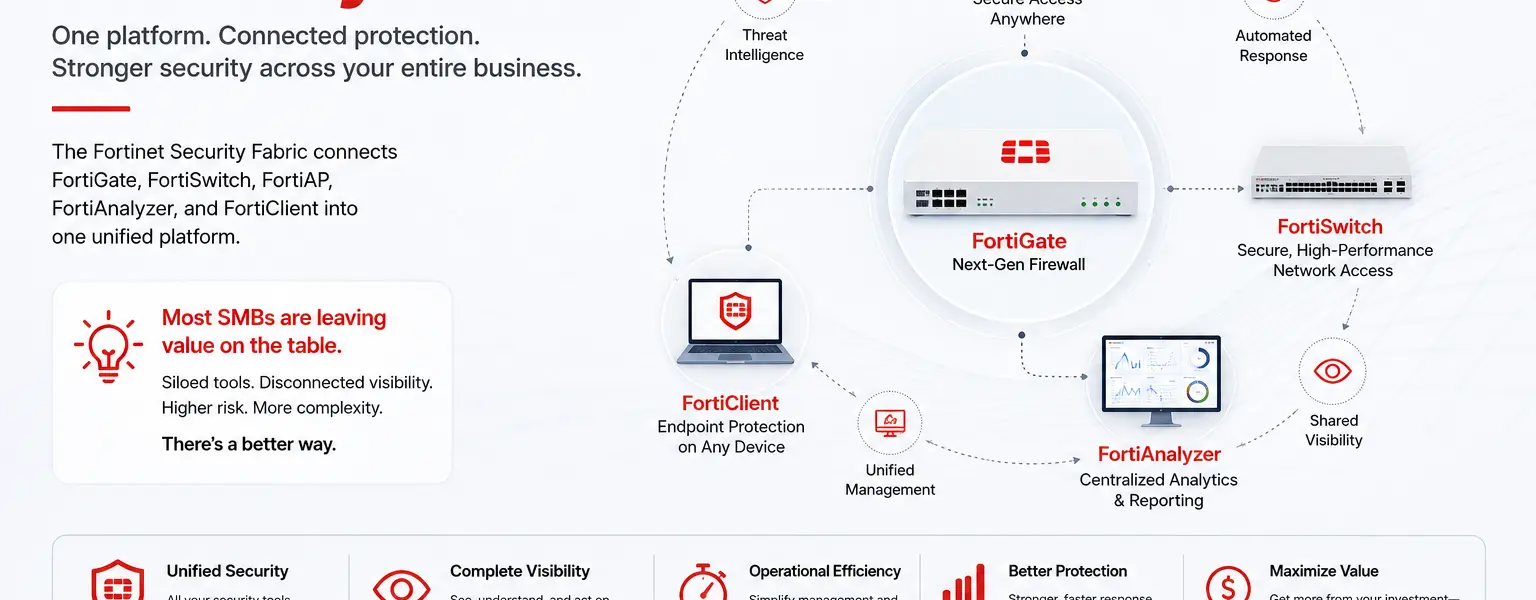
The Fortinet Security Fabric is the architecture that connects every Fortinet product in your environment into a single, coordinated security platform. Most organizations running Fortinet start with a FortiGate firewall and stop there. That is a reasonable starting point, but it leaves most of what the platform is capable of unused. This post explains what the Fortinet Security Fabric actually is, which components make it up, what you gain by connecting them, and why most SMBs are currently getting a fraction of the value their Fortinet investment is capable of delivering.
The Fortinet Security Fabric is not a single product. It is an integrated architecture that allows Fortinet products across network, endpoint, wireless, switching, and management layers to share telemetry, enforce consistent policy, and respond to threats as a coordinated system rather than as a collection of independent devices.
The FortiGate firewall is the root of the Fabric. It anchors policy, automation, and visibility for every other device connected to it. FortiSwitch managed switches, FortiAP wireless access points, FortiClient endpoint agents, FortiAnalyzer for logging and reporting, and FortiManager for centralized management all plug into the Fabric and operate under the FortiGate’s policy model. When a threat is detected on one part of the network, the Fabric can respond across all of it automatically, not just at the point of detection.
The practical result of a properly connected Fortinet Security Fabric is a single pane of glass for security visibility, consistent policy enforcement from the firewall down to individual switch ports and wireless SSIDs, and automated response capabilities that a standalone firewall simply cannot provide.
Understanding the Fortinet Security Fabric starts with understanding what each component contributes and how they interact.
FortiGate is the foundation. Every other Fabric component connects back to it. As a next-generation firewall running FortiOS, FortiGate enforces security policy on all traffic crossing the network perimeter, provides SSL deep-packet inspection, runs IPS, application control, DNS filtering, and antivirus, and distributes those policies to downstream Fabric devices through FortiLink.
FortiLink is the management protocol that allows FortiGate to auto-discover and manage FortiSwitch and FortiAP devices without device-by-device manual setup. When a FortiSwitch or FortiAP joins the network, FortiGate detects it, onboards it into the Fabric, and applies predefined policy templates automatically. This means segmentation policies, inspection rules, and access controls defined on the FortiGate flow down to individual switch ports and wireless SSIDs without requiring separate configuration on each device. Change a policy once on FortiGate and it enforces everywhere.
FortiSwitch provides managed switching that operates as a direct extension of FortiGate policy. From the FortiGate management interface, administrators can see the entire switching layer, configure VLANs and port policies, and apply security controls at the network access layer. An infected device connected to a FortiSwitch port can be quarantined automatically when FortiGate detects a threat, without requiring manual intervention.
FortiAP wireless access points operate on the same principle. Managed through FortiGate via FortiLink, FortiAP SSIDs inherit the same security policies applied to wired traffic. Wireless users are subject to the same inspection, filtering, and access controls as users on wired connections. In a multi-vendor environment, wireless traffic often receives less scrutiny than wired traffic because the access points sit outside the firewall’s policy model. In a Fabric environment that gap does not exist.
FortiClient is the endpoint agent that connects user devices into the Fabric. FortiClient provides endpoint telemetry, including user identity and device posture, back to FortiGate. This telemetry enables identity-based and posture-based policy enforcement: FortiGate can apply different access rules to a fully patched corporate laptop versus a personal device or an unmanaged endpoint. FortiClient EMS (Endpoint Management Server) provides centralized management of FortiClient across the organization, along with Zero Trust tagging and ZTNA capabilities for remote access.
FortiAnalyzer aggregates logs from every Fabric device into a single repository for correlation, reporting, and investigation. Rather than reviewing logs from FortiGate, FortiSwitch, FortiAP, and FortiClient separately, FortiAnalyzer provides a unified view of security events across the entire environment. It supports compliance reporting, forensic investigation, and SOC workflows. For organizations with compliance obligations, the centralized log retention and reporting that FortiAnalyzer provides is often the difference between being able to demonstrate a defensible security posture and not.
FortiManager provides centralized policy management and orchestration across multiple FortiGate devices. For organizations managing more than one location, FortiManager allows security policies to be defined once and deployed consistently across every site. It also provides zero-touch provisioning for new FortiGate deployments, automated firmware management, and configuration backup and change tracking.
The value of the Fortinet Security Fabric is not theoretical. There are specific, concrete capabilities that only become available when the components are connected and working together.
Automated threat response is the most significant. In a standalone FortiGate deployment, when the firewall detects a threat it can block traffic at the perimeter. In a connected Fabric, FortiGate can instruct FortiSwitch to quarantine the infected device at the port level, push a policy update to FortiAP to block the device from reconnecting over wireless, and flag the endpoint in FortiClient for remediation, all in response to a single threat detection event. The speed of that response is the difference between containing an incident and watching it spread laterally across the network.
Unified visibility across wired, wireless, and endpoint is the second major gain. Most organizations running separate firewalls, switches, and access points from different vendors have visibility gaps between those layers. Traffic that moves from wireless to wired, or from an endpoint to a server, crosses boundaries where the security stack loses context. The Fortinet Security Fabric maintains context across all of those boundaries, giving security teams a complete picture of what is happening on the network rather than a partial view from each device’s own logs.
Consistent policy enforcement from perimeter to endpoint is the third. In a multi-vendor environment, it is common for firewall policy to enforce one set of rules, switching policy to enforce another, and wireless policy to enforce a third. Users find ways through gaps between them, intentionally or not. In a Fabric deployment, policy is defined once on FortiGate and enforced consistently at every layer.
The most common pattern in SMB Fortinet deployments is a FortiGate at the perimeter, running a bundle license, doing its job reasonably well, with a separate unmanaged switch and a consumer or prosumer wireless access point that has nothing to do with the FortiGate. FortiAnalyzer is not deployed, so logs are stored on the device itself with limited retention. FortiClient is either not deployed or running in free mode without centralized management.
In this configuration the organization has paid for FortiGate hardware and a bundle license that includes capabilities designed to work across the full Fabric, and is using a small fraction of them. The automated threat response, unified visibility, and consistent policy enforcement described above are all unavailable because the Fabric is not connected.
Building out a full Fabric deployment requires planning, the right hardware at the access layer, FortiAnalyzer either as a physical appliance or a cloud subscription, and the expertise to configure the integrations correctly. For organizations that want to get more out of their existing Fortinet investment without building that expertise internally, working with a Fortinet MSSP is the practical path. A managed service can assess the current environment, identify the gaps, design the right Fabric architecture for the organization’s size and requirements, and manage it on an ongoing basis.
DataCenter360 is a Fortinet Select Partner and MSSP supporting organizations with Fortinet Security Fabric design, deployment, and ongoing management. If your organization is running FortiGate and wants to understand what a full Fabric deployment would look like, reach out at [email protected] or visit our managed security services page to learn more. You can also contact us directly at datacenter360.ca/contact-us.
Not necessarily for basic Fabric functionality, but FortiSwitch and FortiAP are required to get the full benefit of FortiLink-managed policy enforcement and automated threat response at the access layer. A FortiGate can connect to the Fabric with third-party switches and access points in place, but those devices will not inherit FortiGate policy or participate in automated response. If you are due for a switching or wireless refresh, replacing with FortiSwitch and FortiAP is the point at which the full Fabric value becomes available.
FortiLink is the management protocol that allows FortiGate to auto-discover, onboard, and manage FortiSwitch and FortiAP devices. It is the mechanism through which FortiGate extends its policy model down to the access layer. Without FortiLink, each device requires separate management and policy configuration. With FortiLink, FortiGate becomes the single point of control for the entire wired and wireless access layer, which is what makes consistent policy enforcement and automated response at the port and SSID level possible.
FortiGate stores logs locally without FortiAnalyzer, but local log storage has limited retention capacity and no cross-device correlation. FortiAnalyzer aggregates logs from every Fabric device, provides long-term retention, enables threat correlation across the environment, and supports compliance reporting. For organizations with any compliance obligation or incident response requirement, FortiAnalyzer is effectively necessary rather than optional. It is available as a physical appliance or as a cloud subscription, which makes it accessible for smaller deployments that cannot justify dedicated hardware.
Yes. FortiManager extends Fabric management across multiple FortiGate deployments at different sites, allowing security policy to be defined centrally and deployed consistently everywhere. FortiAnalyzer aggregates logs from all locations into a single view. FortiLink-managed FortiSwitch and FortiAP at each site operate under the same policy model as the head office. For multi-location organizations, the Fabric architecture is particularly valuable because it eliminates the policy inconsistency and visibility gaps that are common in distributed environments managed device by device.
DataCenter360 is a Fortinet Select Partner and MSSP supporting organizations worldwide with Security Fabric design, deployment, and management. Contact us at [email protected] or visit datacenter360.ca/contact-us to speak with a specialist.
